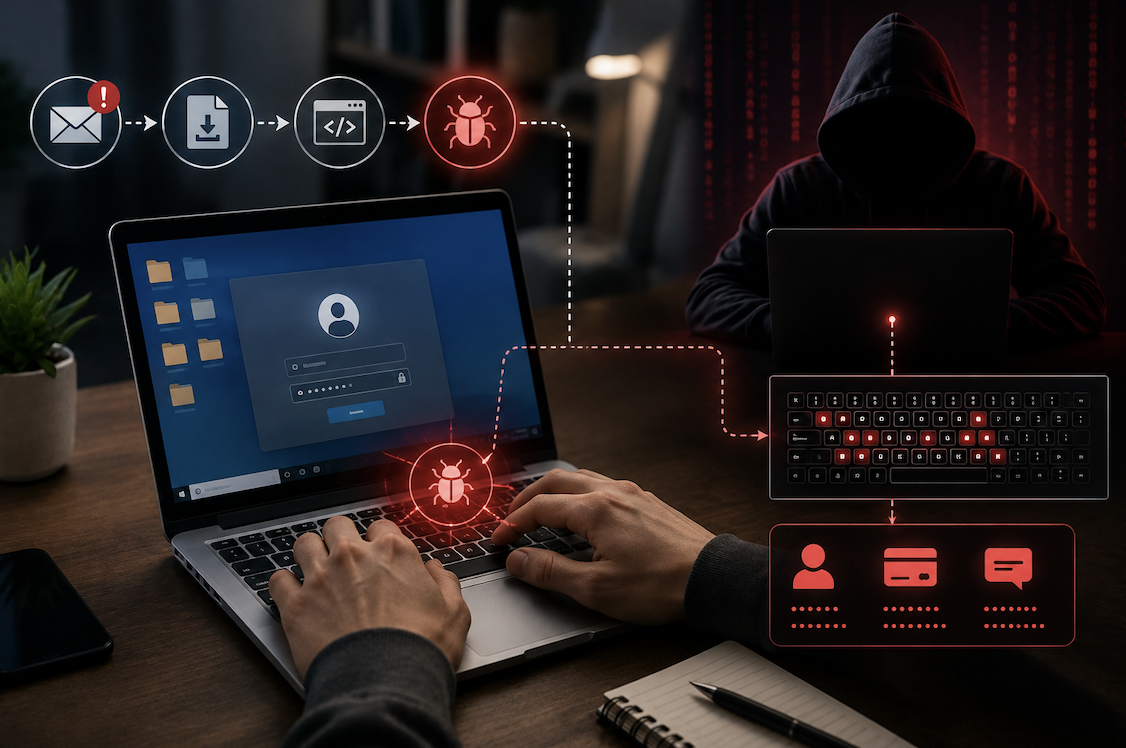
Among the many types of malicious software circulating online, keyloggers represent a particularly invasive and quietly dangerous category, capable of capturing everything you type, including passwords, private messages, and financial details, often without any obvious sign that something is wrong. Understanding what a keylogger actually is and how it typically infects a device provides genuinely important context for protecting yourself against this specific threat.
What a Keylogger Actually Does
A keylogger is a type of software, or in some cases hardware, specifically designed to record every keystroke a user types on a device, capturing this information and typically sending it to whoever deployed the keylogger in the first place. This captured data can include passwords, private conversations, credit card numbers, and any other sensitive information typed on the infected device.
Keyloggers are particularly dangerous precisely because they operate silently in the background, often without any visible indication to the victim that their keystrokes are being recorded and transmitted elsewhere. Unlike more obvious forms of malware that might display disruptive pop-ups or noticeably degrade device performance, a well-designed keylogger can operate almost entirely undetected for extended periods.
The Different Types of Keyloggers Worth Understanding
Keyloggers come in several genuinely distinct forms, and understanding these differences helps clarify the range of ways this threat can actually manifest.
- Software keyloggers install as a program on a device, running in the background to capture keystrokes
- Hardware keyloggers are small physical devices plugged between a keyboard and computer, intercepting keystrokes directly
- Kernel-level keyloggers operate at a deep system level, making them particularly difficult to detect and remove
- Some keyloggers also capture screenshots, clipboard content, or browsing activity alongside basic keystroke recording
Hardware keyloggers deserve particular attention, since they require physical access to install but can be genuinely difficult to detect through software-based security scans alone, since they intercept data at the physical connection level rather than running as detectable software on the device itself.
How Keyloggers Actually Infect Devices
Keyloggers typically reach a victim’s device through several common infection methods, most of which rely on tricking the user into voluntarily installing malicious software, often disguised as something else entirely.
- Malicious email attachments disguised as legitimate documents or files
- Software downloaded from untrustworthy or unofficial sources, sometimes bundled alongside legitimate programs
- Malicious links that trigger an automatic, unauthorized download when clicked
- Compromised websites that exploit browser vulnerabilities to install software without explicit user action
- Physical access, particularly for hardware keyloggers, requiring someone to physically connect the device
Email attachments and untrustworthy software downloads remain among the most common infection vectors, precisely because they rely on tricking a user into taking an action that appears legitimate, rather than requiring the attacker to exploit a genuinely sophisticated technical vulnerability.
Why Keyloggers Are So Difficult to Detect
Well-designed keylogger software is specifically engineered to avoid detection, often disguising its processes to appear as legitimate system software, minimizing any noticeable impact on device performance that might otherwise alert a victim that something unusual is happening.
- Sophisticated keyloggers disguise their processes to resemble legitimate system software
- Minimal performance impact means victims often notice no obvious signs of infection
- Some keyloggers actively evade detection by security software through various evasion techniques
- Regular, thorough security scans using updated software provide the most reliable detection method available
This combination of stealth and minimal observable impact is exactly why keyloggers can operate undetected for extended periods, sometimes for months, quietly capturing sensitive information the entire time without the victim having any reason to suspect a problem.
Warning Signs That May Indicate a Keylogger Infection
While well-designed keyloggers are specifically built to avoid detection, certain warning signs can occasionally indicate a potential infection worth investigating further.
- Unusual, unexplained account activity or login attempts you did not personally initiate
- Noticeably reduced device performance without any other obvious explanation
- Antivirus or security software flagging suspicious, unfamiliar processes running in the background
- Unexpected pop-ups or browser redirects that suggest broader malware presence on the device
- Unfamiliar programs appearing in your list of installed software that you do not remember installing
Practical Steps to Protect Yourself From Keyloggers
- Only download software from official, reputable sources rather than unofficial or unverified websites
- Avoid opening email attachments or clicking links from unfamiliar or suspicious senders
- Keep your operating system, browser, and security software updated to patch known vulnerabilities
- Run regular, thorough scans using reputable, updated antivirus and anti-malware software
- Be cautious about physical device security, since hardware keyloggers require physical access to install
- Use two-factor authentication on important accounts, adding protection even if a password gets captured
Why Mobile Devices Face a Somewhat Different Keylogger Risk
While keyloggers historically targeted primarily desktop and laptop computers, mobile devices face a somewhat different, though genuinely related, version of this risk, typically through malicious apps rather than traditional keylogger software installed directly onto an operating system. A malicious app with excessive permissions could potentially monitor what you type within that specific app, or in more concerning cases, request accessibility permissions that grant considerably broader access to on-screen activity across your entire device.
This distinction matters for practical protection, since mobile keylogger-style threats often hide behind seemingly legitimate app functionality, making careful attention to app permissions and app store reputation particularly important on mobile devices specifically. Reviewing exactly what permissions an app requests during installation, and questioning why a simple utility app might need access to accessibility features or broad screen monitoring capabilities, represents a genuinely important mobile-specific defense against this category of threat.
- Mobile keylogger-style threats typically operate through malicious apps rather than traditional installed software
- Excessive app permissions, particularly accessibility access, can enable broader monitoring capabilities
- Reviewing requested permissions carefully during app installation helps identify potentially concerning requests
- Downloading apps only from official app stores significantly reduces, though does not entirely eliminate, this risk
Why Keyloggers Are Sometimes Used Legitimately
While the term keylogger carries an overwhelmingly negative connotation, it is worth noting that this same underlying technology does have some legitimate, disclosed uses, and understanding this distinction helps clarify what actually separates a malicious keylogger from a legitimate monitoring tool built on similar underlying technology.
Parental control software, for example, sometimes includes keystroke logging as a disclosed feature specifically intended to help parents monitor a child’s online activity, with the child and any other household members generally aware the software is installed. Similarly, some workplaces use monitoring software on company-owned devices, again with disclosed policies informing employees this monitoring occurs. The genuinely important distinction is not the underlying technology itself, but rather whether the person whose keystrokes are being recorded has been informed and, ideally, has consented to this monitoring taking place.
- Legitimate keystroke monitoring exists in disclosed parental control and workplace monitoring software
- The key distinction from malicious keyloggers involves disclosure and, ideally, genuine consent
- Malicious keyloggers specifically operate without the victim’s knowledge or any legitimate disclosure
- This distinction matters for understanding that the underlying technology itself is not inherently only malicious
Final Thoughts
Keyloggers represent a genuinely invasive threat precisely because they operate silently, capturing sensitive keystrokes without the obvious warning signs that accompany many other forms of malware. Understanding how these threats typically infect devices, primarily through malicious downloads, email attachments, and compromised links, provides a practical foundation for the cautious habits that meaningfully reduce your risk of falling victim to this particular, quietly dangerous category of threat.
Frequently Asked Questions
1. Can antivirus software reliably detect all keyloggers?
Reputable, updated antivirus software can detect many known keyloggers, though particularly sophisticated or newly developed variants can occasionally evade detection temporarily until security software gets updated to recognize their specific patterns.
2. Are keyloggers illegal?
Installing a keylogger on someone else’s device without their knowledge or consent is illegal in most jurisdictions, though keyloggers do have limited legitimate uses, such as parental monitoring software or workplace device monitoring, when disclosed and consented to appropriately.
3. How can I check if my device has a hardware keylogger installed?
Physically inspect the connection between your keyboard and computer for any unfamiliar device plugged in between them, since hardware keyloggers require this physical intermediary connection to intercept keystrokes.
4. Does two-factor authentication protect me even if a keylogger captures my password?
Yes, significantly. Even if a keylogger successfully captures your password, two-factor authentication requires an additional verification step that a keylogger typically cannot capture, meaning your account generally remains protected despite the compromised password.
5. Should I be worried about keyloggers on public or shared computers?
Yes, public and shared computers represent a genuinely elevated risk, since you have no way to verify what software or hardware might already be installed, which is exactly why avoiding entering sensitive information, like passwords, on unfamiliar shared devices remains a wise precaution.