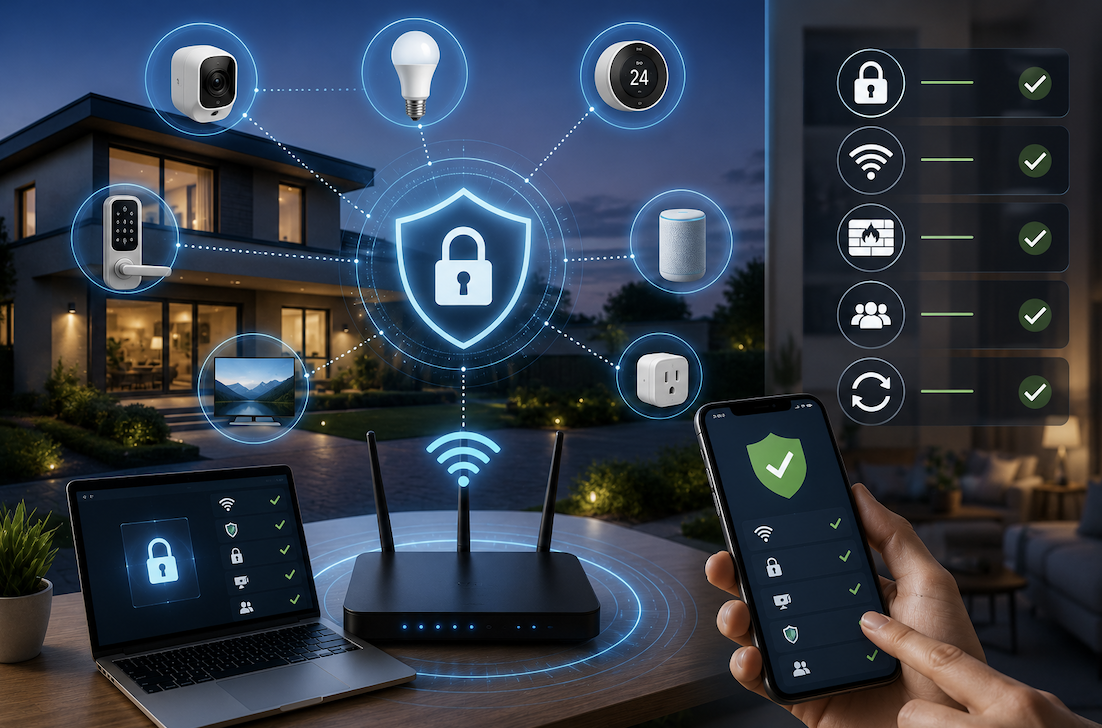
Filling a home with connected devices, from smart speakers to security cameras to smart thermostats, brings genuine convenience, but each additional connected device also represents another potential entry point a hacker could exploit if the underlying network is not properly secured. Unlike a single computer with dedicated security software, smart home devices often have weaker built-in security, making the overall network’s protection genuinely important. This article walks through practical, effective steps for securing a smart home network.
Why Smart Home Devices Represent a Genuine Security Concern
Smart home devices, often called Internet of Things or IoT devices, frequently prioritize convenience and low cost over robust security, sometimes shipping with weak default passwords, infrequent security updates, or genuinely limited built-in security features compared to a traditional computer or smartphone.
This combination creates a meaningful vulnerability, since a hacker who successfully compromises even one relatively insecure smart device on your network could potentially use that access as a stepping stone toward accessing other devices, or your broader home network, depending on how your network is actually configured and segmented.
- Smart home devices often ship with weaker default security compared to computers and smartphones
- Manufacturers vary considerably in how consistently they provide ongoing security updates
- A single compromised device can potentially serve as an entry point to your broader network
- The sheer number of connected devices in a modern smart home creates a genuinely larger overall attack surface
Step One: Change Default Passwords on Every Single Device
The single most impactful, and unfortunately most frequently skipped, step in securing a smart home network involves changing the default password on every single connected device, since default passwords are widely known and often specifically targeted by automated attack tools scanning for vulnerable devices.
- Change default passwords on your router, smart speakers, cameras, and every other connected device
- Use unique, strong passwords for each device rather than reusing the same password across multiple devices
- Consider using a password manager to help generate and organize these unique credentials effectively
- Do not skip devices that seem unimportant, since even a seemingly minor device can serve as a network entry point
Step Two: Secure Your Router as the Central Gateway
Your router serves as the central gateway for your entire smart home network, making its security genuinely foundational to protecting every device connected through it. A compromised router potentially exposes every single device on your network simultaneously.
- Change your router’s default administrator password immediately after setup
- Enable WPA3 encryption if your router supports it, or WPA2 at minimum for older routers
- Keep your router’s firmware updated, since manufacturers regularly release security patches
- Disable remote management features on your router unless you genuinely need this specific capability
- Consider changing your router’s default network name to something that does not reveal the router’s manufacturer or model
Step Three: Create a Separate Network Specifically for Smart Home Devices
Many modern routers support creating a separate network, often called a guest network or a dedicated IoT network, specifically isolated from your primary network where computers and phones with more sensitive data typically connect.
- Place smart home devices on a separate network from your primary computers and phones
- This network segmentation limits the potential damage if a smart device becomes compromised
- A compromised device on this separate network cannot easily access your primary network’s other devices
- Check your specific router’s settings to see what network segmentation options are actually available
This approach genuinely mirrors a broader security principle used in more sophisticated network environments: limiting how far an attacker can move within a network even if they successfully compromise one specific entry point.
Step Four: Keep Device Firmware and Apps Updated
Smart home device manufacturers periodically release firmware updates addressing security vulnerabilities discovered after a device’s initial release, making consistent updating a genuinely important, ongoing security practice rather than a one-time setup task.
- Enable automatic updates for smart home devices whenever this option is available
- Periodically check manually for updates on devices that do not support automatic updating
- Update companion smartphone apps used to control and manage your smart home devices
- Consider a device manufacturer’s update history and track record before purchasing new smart home products
Step Five: Review and Limit Device Permissions and Data Collection
Many smart home devices collect more data than most users realize, and reviewing what specific permissions and data access each device actually requires helps limit unnecessary exposure beyond what is genuinely needed for the device to function properly.
- Review privacy settings and permissions for each smart home device and its companion app
- Disable microphone or camera access for devices that do not genuinely need this capability enabled
- Consider what data a specific device manufacturer collects and how that data gets used or shared
- Remove or factory reset devices you no longer actively use rather than leaving them connected indefinitely
Step Six: Monitor Your Network for Unusual Activity
Periodically reviewing what devices are actually connected to your network and watching for any unfamiliar or unexpected activity provides an additional layer of ongoing security awareness beyond the initial setup steps.
- Periodically review the list of devices connected to your network through your router’s admin interface
- Investigate any unfamiliar device names or unexpected connections you do not recognize
- Consider network monitoring tools or apps that provide more detailed visibility into network activity
- Set up alerts for new device connections if your router or a security app supports this feature
Practical Additional Considerations for Comprehensive Protection
- Research a device’s security reputation and update history before purchasing new smart home products
- Avoid connecting genuinely unnecessary devices to your network simply because a smart version exists
- Consider a dedicated firewall or security appliance for particularly security-conscious smart home setups
- Regularly review and remove old, unused smart home accounts and associated app permissions
Why Some Smart Home Devices Deserve Particularly Careful Scrutiny
Not every category of smart home device carries the same level of genuine security risk, and understanding which specific types of devices deserve particularly careful attention helps you prioritize your security efforts where they matter most, rather than spreading equal concern evenly across every connected device in your home.
Devices with cameras or microphones, like security cameras, smart doorbells, and voice assistants, deserve particularly careful scrutiny, since a genuine compromise of these specific devices could expose considerably more sensitive information, including audio or video from inside your actual home, compared to a compromised smart light bulb or plug, which presents comparatively limited risk even if compromised. Prioritizing security effort toward these higher-risk device categories represents a genuinely practical, efficient approach to smart home security overall.
- Devices with cameras or microphones present meaningfully higher risk if compromised compared to simpler devices
- Security cameras, smart doorbells, and voice assistants deserve particularly careful security attention
- Lower-risk devices, like smart plugs or light bulbs, still deserve basic security hygiene, though with somewhat less urgency
- Prioritizing security effort based on genuine risk level represents an efficient, practical approach to overall home network security
Final Thoughts
Securing a smart home network requires genuine, deliberate attention across several layers: changing default passwords everywhere, securing your central router, segmenting devices onto a separate network, and maintaining consistent updates over time. Taking these practical steps meaningfully reduces your real-world risk, transforming a smart home from a potentially vulnerable collection of individually weak devices into a considerably more resilient, well-protected network overall.
Frequently Asked Questions
1. Is it really necessary to change every single default password, even on minor devices?
Yes, genuinely. Automated attack tools specifically scan for devices still using known default passwords, and even a seemingly minor device can potentially serve as an entry point to your broader network if left with default, widely known credentials.
2. Do all routers support creating a separate network for smart home devices?
Most modern routers support at least a basic guest network feature, though more sophisticated network segmentation options vary by specific router model, so checking your particular router’s capabilities and settings is worth doing directly.
3. How often should I check for firmware updates on my smart home devices?
Enabling automatic updates whenever available is the most reliable approach, though for devices without this feature, checking manually every few months provides a reasonable balance between staying current and not requiring excessive ongoing effort.
4. Can a hacked smart home device actually access my computer or personal files?
If your smart home devices share the same network as your computer without any segmentation, a compromised device could potentially be used as a stepping stone to attempt accessing other devices on that same network, which is exactly why network segmentation matters.
5. Is buying cheaper, off-brand smart home devices genuinely riskier from a security perspective?
Generally yes, since well-established manufacturers typically invest more consistently in security updates and have more accountability and reputation at stake, while lesser-known or budget brands sometimes provide less reliable ongoing security support after the initial sale.