Remembering dozens of unique, complex passwords for every website and app is practically impossible without help, which is exactly why password managers have become such an essential tool for staying secure online. But trusting a single app with every one of your passwords naturally raises an important question: how does that data actually stay protected? This article explains the genuine security technology behind password managers.
The Core Idea Behind Password Manager Security
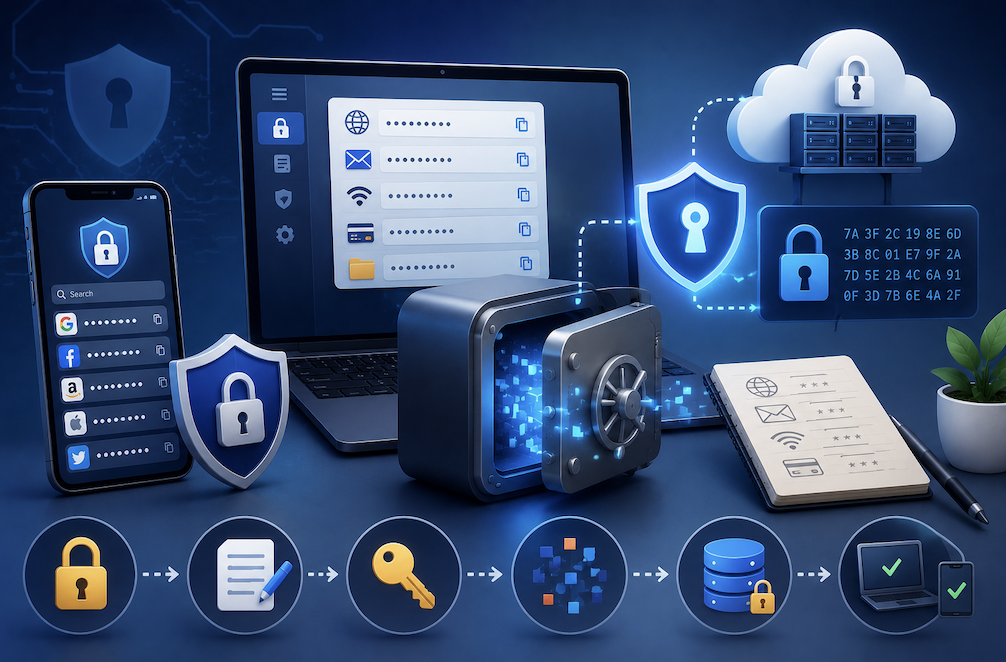
Password managers rely heavily on a security concept called encryption, which scrambles your stored data into an unreadable format that can only be reversed with a specific, unique key. In the case of a password manager, that key is typically derived from your master password, the single password you actually need to remember to access everything else stored inside.
Because your stored passwords are encrypted, even if someone managed to gain unauthorized access to the underlying data, whether by hacking the company’s servers or intercepting a data transfer, they would only see scrambled, unreadable information without the correct decryption key.
What Zero Knowledge Architecture Actually Means
Many reputable password managers use what is called a zero knowledge architecture, meaning the company providing the service never actually has access to your unencrypted data, and often does not even store your master password directly. Instead, your master password gets used locally on your own device to generate the encryption key needed to unlock your stored data.
This design means that even the password manager company itself cannot see your actual stored passwords, and if their servers were ever breached, attackers would only find encrypted data that remains genuinely useless without your specific master password.
- Your master password generates a unique encryption key locally on your own device
- The company hosting the service typically never sees your actual unencrypted passwords
- Even a server breach would only expose encrypted, unreadable data without your master password
- This architecture significantly limits the damage possible even in a worst case security incident
How Your Data Actually Gets Encrypted and Decrypted
When you save a new password, your password manager immediately encrypts it using your derived encryption key before it ever gets stored or synced to any server. When you need to access that password later, whether to autofill a login form or view it manually, the app decrypts the data locally on your device using that same key, briefly making it readable only within your own secure session.
This encryption and decryption process happens automatically in the background, meaning you never have to think about the technical details while still benefiting from genuinely strong security protecting your sensitive login information.
Why a Strong Master Password Matters So Much
Since your master password is the single key that unlocks access to every other password you have stored, its strength directly determines how secure your entire password vault actually is. A weak or easily guessed master password significantly undermines all the sophisticated encryption technology working to protect your data behind the scenes.
- Choose a long, unique master password that you do not use anywhere else
- Consider using a memorable passphrase rather than a short, complex string that is hard to recall
- Enable additional authentication factors, like a fingerprint or authenticator app, wherever available
- Never share your master password with anyone, including customer support representatives
Practical Tips for Using a Password Manager Safely
- Choose a reputable password manager with a proven, independently audited security track record
- Enable two factor authentication on your password manager account itself for an extra layer of protection
- Regularly review stored passwords and update any that are weak, reused, or outdated
- Keep your password manager app updated to ensure you have the latest security improvements
How Password Managers Handle Syncing Across Multiple Devices
Most people want their passwords accessible across a laptop, phone, and tablet, which raises a reasonable question about how that syncing happens without compromising the strong encryption protecting the data. Reputable password managers handle this by syncing only the already encrypted data across your devices, meaning the actual decryption still only happens locally on whichever device you are currently using, using your master password.
This means that even during the syncing process itself, your sensitive password data remains encrypted the entire time it travels between your devices and the password manager’s servers, only becoming readable again once it reaches a device where you have entered your correct master password locally.
- Encrypted data syncs between your devices and the password manager’s servers
- Decryption only happens locally, on your device, after you enter your master password
- Data remains encrypted throughout the entire syncing process, including in transit
- This design maintains strong security even while providing convenient cross device access
Understanding this syncing process helps explain why a password manager can offer both genuine convenience across multiple devices and strong security simultaneously, rather than forcing a trade off between the two.
Final Thoughts
Password managers rely on genuinely strong encryption and thoughtful security architecture to protect sensitive login information, often keeping your data secure even from the company providing the service itself. Understanding how this technology actually works can make it much easier to trust and confidently adopt a password manager as a foundational part of your overall online security, rather than continuing to rely on memory alone.
Frequently Asked Questions
1. What happens if I forget my master password?
Because of zero knowledge architecture, many password managers cannot recover your master password for you, meaning forgetting it can result in permanently losing access to your stored data, which is why choosing a memorable but strong password matters so much.
2. Can a password manager company see my stored passwords?
With a genuine zero knowledge architecture, no, the company hosting the service does not have access to your unencrypted data, since encryption and decryption both happen locally using a key derived from your master password.
3. Are password managers actually safer than reusing a few memorized passwords?
Yes, significantly. Reusing passwords means a single data breach on one website can compromise your accounts everywhere else, while a password manager allows unique, strong passwords for every account without requiring you to memorize each one.
4. Is it safe to store passwords in a browser instead of a dedicated password manager?
Browser based password storage offers some convenience but generally provides less robust security features compared to a dedicated password manager, particularly around encryption standards and cross device security practices.