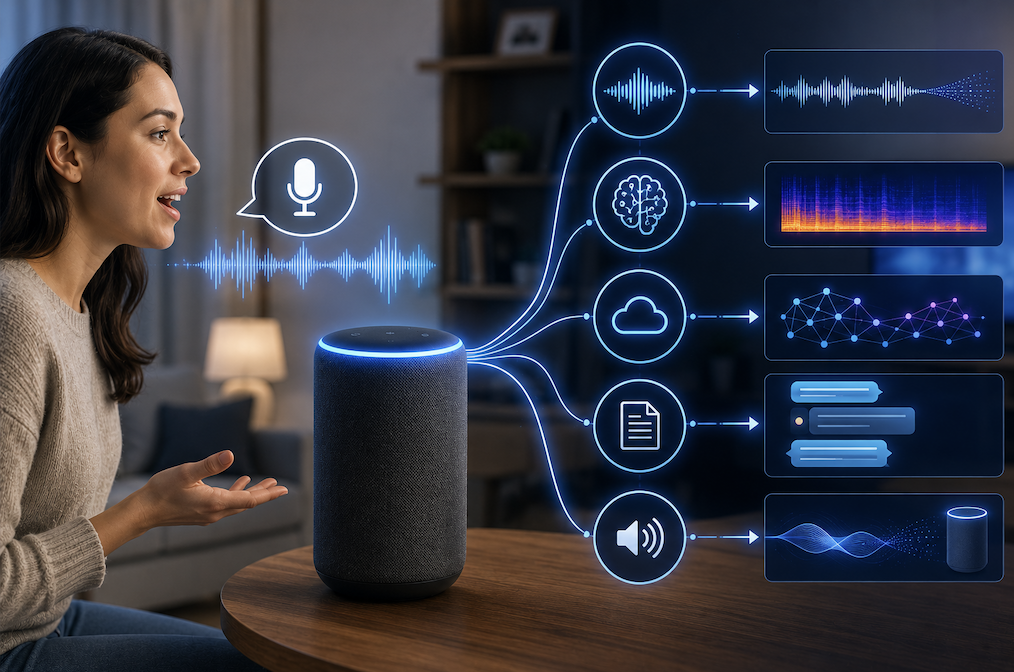
Asking a voice assistant to set a timer, check the weather, or play a specific song and having it respond correctly within a second or two involves a genuinely sophisticated chain of technical processes happening behind the scenes, all completed remarkably quickly. Understanding how a voice assistant actually understands what you say reveals several distinct technologies working together seamlessly. This article breaks down this process step by step.
The Overall Process a Voice Assistant Follows
When you speak a command to a voice assistant, several distinct technical stages happen in rapid succession before you receive a response. First, the device needs to recognize that you are actually addressing it, often through a specific wake word. Then it needs to convert your spoken words into text, understand what you actually meant by that text, determine an appropriate action or response, and finally deliver that response, often through synthesized speech.
- Wake word detection identifies that you are actually addressing the voice assistant
- Speech recognition converts your spoken audio into written text
- Natural language understanding interprets the actual meaning and intent behind that text
- The system determines an appropriate action or response based on this understood intent
- The response gets delivered, often through synthesized speech generated by the system
This entire sequence typically completes within a second or two, which represents a genuinely impressive technical achievement given the sophistication of each individual stage involved in the overall process.
How Wake Word Detection Actually Works
Before a voice assistant processes your actual command, it first needs to recognize that you are addressing it specifically, rather than simply having a normal conversation nearby that happens to include similar-sounding words. This wake word detection needs to run continuously, listening for this specific trigger phrase without constantly recording and analyzing everything else you say throughout the day.
- A small, efficient audio model runs continuously, specifically listening for the designated wake word
- This detection happens locally on the device itself, without needing to send constant audio to external servers
- Only after detecting the wake word does the device begin actively processing your subsequent spoken command
- This design balances genuine responsiveness against reasonable privacy and battery efficiency considerations
This local, always-listening wake word detection is specifically designed to be lightweight and efficient, since it needs to run continuously without significantly draining battery life or requiring constant data transmission for something that, most of the time, is simply detecting that the specific trigger word was not spoken.
How Speech Recognition Converts Your Words Into Text
Once the wake word triggers active listening, the voice assistant captures your subsequent spoken command and converts it into text using speech recognition technology, a process that analyzes the acoustic patterns of your speech and matches them against learned patterns to determine the most likely words spoken.
- Your spoken command gets captured as digital audio for processing
- Speech recognition technology analyzes acoustic patterns to identify likely words and phrases
- Context and language modeling help resolve ambiguity between similar-sounding words
- The result is a text representation of what you actually said, ready for the next processing stage
This stage relies on the same fundamental speech recognition technology used across many different applications, converting the genuinely messy, variable nature of human speech into structured text the system can then work with in subsequent processing stages.
How Natural Language Understanding Interprets Your Intent
Simply converting your speech into text is not enough for the voice assistant to actually respond helpfully, since it needs to understand what you actually meant by that text, distinguishing between a request for weather information, a music playback command, or a simple question, even when phrased in many different possible ways.
- Natural language understanding analyzes the text to identify your actual underlying intent
- The system recognizes key entities within your request, like a specific song title or a location for weather information
- This processing accounts for the many different ways people might phrase the same underlying request
- The system maps your understood intent to a specific, actionable response the assistant can actually execute
This intent recognition represents a genuinely sophisticated language processing challenge, since the same underlying request, like wanting to know the weather, might be phrased in dozens of genuinely different ways, and the system needs to reliably recognize the common underlying intent regardless of the specific phrasing used.
How the System Determines and Delivers an Appropriate Response
Once the voice assistant has determined your actual intent, it needs to execute an appropriate action, whether that involves retrieving specific information, controlling a connected smart home device, or performing some other requested task, then communicate the result back to you, often through synthesized speech.
- The system executes the appropriate action based on your understood intent, such as retrieving weather data
- For informational requests, this often involves querying a data source and formatting an appropriate response
- Text-to-speech technology converts the system’s response back into natural-sounding spoken audio
- The entire response gets delivered back to you, ideally within just a second or two of your original request
Why Voice Assistants Sometimes Misunderstand Requests
Despite genuinely impressive technical sophistication, voice assistants still occasionally misunderstand requests, and understanding the common causes helps explain why this happens and how to phrase requests more effectively.
- Background noise can interfere with accurate speech recognition, particularly in busy environments
- Ambiguous phrasing can lead to genuine confusion about your actual intended meaning
- Unusual accents or speech patterns not well represented in training data can reduce recognition accuracy
- Requests involving genuinely novel or unusual combinations of words can challenge intent recognition systems
Practical Tips for Better Voice Assistant Interactions
- Speak clearly and at a natural, moderate pace rather than unusually fast or unnaturally slow
- Minimize background noise when possible for more accurate speech recognition
- Phrase requests in reasonably natural, straightforward language rather than overly complex sentence structures
- Wait for the device to fully process your request rather than speaking over an ongoing response
- Rephrase your request if the assistant clearly misunderstood, rather than simply repeating the identical phrasing
How Voice Assistants Handle Follow-Up Questions Within a Conversation
A genuinely useful capability many modern voice assistants offer involves maintaining some awareness of recent conversational context, allowing you to ask a follow-up question without needing to restate the full context each time, similar to how a natural human conversation flows from one related question to the next without requiring constant repetition.
This contextual awareness requires the system to temporarily retain information about your recent requests, allowing a follow-up question to be correctly interpreted in relation to what was just discussed, rather than treating every single question as a completely isolated, standalone request disconnected from anything that came immediately before it. This capability represents a genuinely more sophisticated processing challenge than handling isolated commands, since the system needs to determine which specific prior context remains actually relevant to a new, related follow-up request.
- Many voice assistants maintain short-term awareness of recent conversational context
- This allows natural follow-up questions without requiring you to restate full context each time
- The system must determine which specific prior context remains relevant to a new request
- This capability varies considerably in sophistication between different voice assistant systems
Final Thoughts
Voice assistants combine wake word detection, speech recognition, natural language understanding, and speech synthesis into a remarkably fast, seamless chain of technical processes, all completing within just a second or two of your spoken request. Understanding this multi-stage process helps explain both the genuinely impressive technical sophistication behind this everyday convenience and the specific reasons behind occasional misunderstandings you might encounter during actual use.
Frequently Asked Questions
1. Is my voice assistant always listening and recording everything I say?
Most voice assistants only actively process and transmit audio after detecting the specific wake word, with wake word detection itself happening locally on the device, though it is worth reviewing your specific device’s privacy settings and policies for complete accuracy on this point.
2. Why does my voice assistant sometimes activate when I did not say the wake word?
This can happen when background sounds or conversation happen to closely resemble the wake word’s acoustic pattern, triggering a false activation, which remains an occasional, though generally infrequent, limitation of current wake word detection technology.
3. Do voice assistants understand context from previous questions in a conversation?
Many modern voice assistants do support some degree of contextual understanding across a short conversation, allowing follow-up questions without needing to restate full context each time, though this capability varies considerably between different systems.
4. Can voice assistants understand multiple languages?
Many voice assistants support multiple languages, though you typically need to configure your preferred language in the device settings, and switching fluidly between multiple languages within the same conversation remains a genuinely difficult challenge for most current systems.
5. Why do voice assistants sometimes take longer to respond than usual?
Response time can be affected by internet connection quality, since many voice assistants rely on cloud-based processing for more complex requests, along with the specific complexity of your particular request and current server demand.