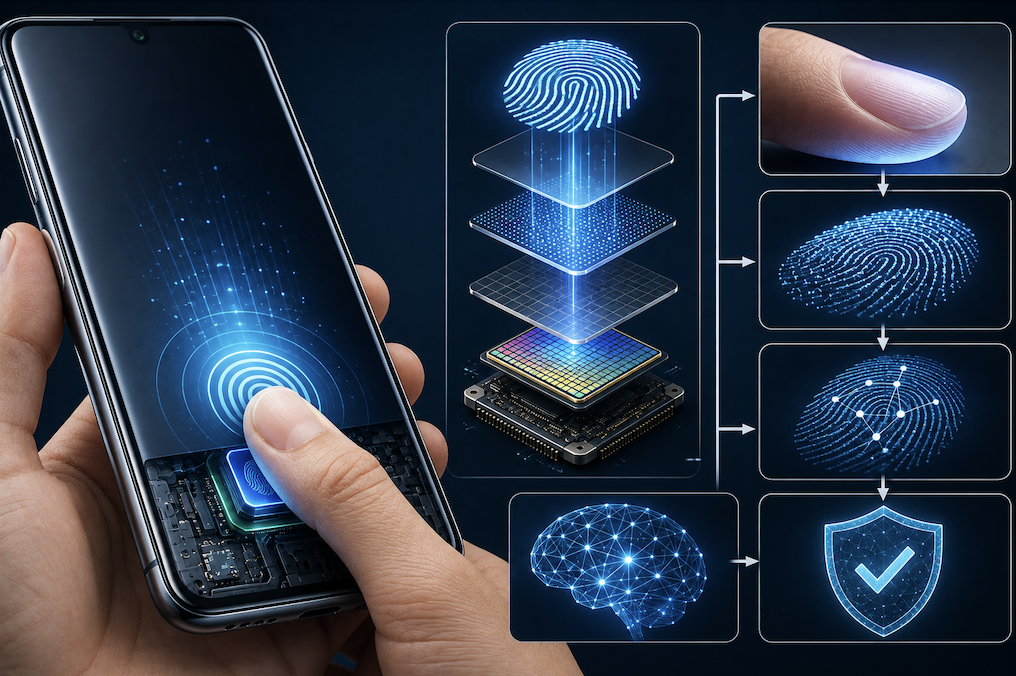
Pressing a finger against a small sensor and having your phone unlock almost instantly has become such a routine part of daily life that few people stop to consider the genuinely clever technology making it possible. Fingerprint scanning relies on detecting the unique physical patterns of your finger with remarkable precision and speed. This article explains exactly how this technology actually works.
The Core Idea Behind Fingerprint Recognition
Every person’s fingerprint contains a unique pattern of ridges and valleys, formed before birth and remaining consistent throughout life, aside from temporary changes like cuts or dryness. Fingerprint scanning technology captures this unique ridge pattern and compares it against a securely stored reference captured when you first set up the feature, using the match, or lack of one, to determine whether to unlock your device.
Because this ridge pattern is genuinely unique to each individual, even between identical twins, it serves as a reliable form of biometric verification, assuming the scanning technology itself captures enough detail to distinguish between genuinely similar patterns.
The Different Types of Fingerprint Sensors Used in Phones
Not every phone uses exactly the same underlying sensor technology, and understanding the differences helps explain variations in speed, accuracy, and placement across different devices.
- Capacitive sensors use small electrical charges to map the ridges and valleys of your fingerprint
- Optical sensors use light to capture an image of your fingerprint pattern
- Ultrasonic sensors use sound waves to create a detailed, three-dimensional map of your fingerprint
- Under-display sensors, often ultrasonic or optical, scan through the phone’s screen itself
Ultrasonic sensors, increasingly common in premium phones, generally offer the most accurate readings since they capture genuine three-dimensional depth information about your fingerprint’s ridge structure, rather than relying solely on a flat, two-dimensional image.
How the Actual Matching Process Happens
When you register your fingerprint during setup, the sensor captures multiple images from different angles and pressure points, building a comprehensive reference template rather than relying on just one single scan. This template gets converted into a mathematical representation and stored securely, typically within a protected area of the phone’s hardware isolated from the rest of the operating system.
- Multiple scans during setup capture your fingerprint from different angles and pressure levels
- This data converts into a secure mathematical representation, not a literal stored image
- Each unlock attempt gets compared against this securely stored reference template
- The matching process typically completes in a fraction of a second
This is why setup often asks you to reposition your finger multiple times, since capturing varied angles and pressure points significantly improves the reliability of future matching attempts, particularly for unlock attempts that do not perfectly replicate your exact initial finger placement.
Why Fingerprint Sensors Sometimes Fail to Recognize You
Various everyday factors can temporarily reduce fingerprint scanning accuracy, which explains why this feature occasionally fails even for a genuinely registered finger.
- Wet, dirty, or excessively dry fingers can interfere with accurate ridge detection
- Minor cuts or significant calluses can temporarily alter your fingerprint pattern
- Incorrect finger positioning or insufficient pressure can prevent a successful match
- Screen protectors of poor quality can sometimes interfere with under-display sensors specifically
Practical Tips for Reliable Fingerprint Scanning
- Register multiple fingers during setup to provide backup options if one finger has trouble
- Keep the sensor area clean and free of dirt, lotion residue, or moisture
- Re-register your fingerprint if you notice declining accuracy over time
- Use a screen protector specifically compatible with your phone’s under-display sensor, if applicable
Why Fingerprint Data Stays Isolated From the Rest of Your Phone
A genuinely important security design choice in modern smartphones involves keeping your fingerprint data completely isolated from the main operating system and any apps running on your device. Rather than storing this sensitive biometric data alongside your regular files, manufacturers use a dedicated, physically separated area of the phone’s hardware specifically designed to store and process this information securely.
This isolation means that even if malicious software somehow compromised your phone’s main operating system, it still could not directly access your raw fingerprint data, since that information never actually leaves this protected hardware area in a readable form. Apps requesting fingerprint verification simply receive a yes or no confirmation from this secure area, rather than ever handling your actual fingerprint data themselves.
- Fingerprint data is stored in a dedicated, physically isolated area of the phone’s hardware
- This isolation protects the data even if the main operating system were somehow compromised
- Apps only receive a confirmation result, never direct access to your actual fingerprint data
- This architecture reflects a deliberate, security focused design choice across most modern smartphones
Final Thoughts
Fingerprint scanning technology relies on capturing and securely matching the genuinely unique ridge patterns present on every person’s fingers, using increasingly sophisticated sensor technology to do so quickly and reliably. Understanding how this process actually works helps explain both its everyday convenience and the legitimate security reasoning behind why it has become such a standard feature across modern smartphones.
Frequently Asked Questions
1. Does my phone actually store an image of my fingerprint?
No, most modern systems store a mathematical representation derived from your fingerprint’s unique features, not an actual reproducible image, and this data typically stays securely isolated on your device.
2. Can someone unlock my phone using a photo of my fingerprint?
Modern sensors, particularly ultrasonic ones, capture genuine depth and ridge detail that a simple flat photograph cannot replicate, making this type of attack significantly more difficult than commonly imagined in movies.
3. Why does fingerprint scanning sometimes work better on one finger than another?
This often comes down to how much detail the sensor captured during initial setup, along with natural variations in ridge clarity between different fingers, which is why registering multiple fingers is generally recommended.
4. Is fingerprint scanning more secure than a passcode?
Both offer strong security when implemented well, though fingerprint scanning offers the practical convenience of not needing to remember or manually enter anything, while a passcode remains valuable as a reliable backup method.