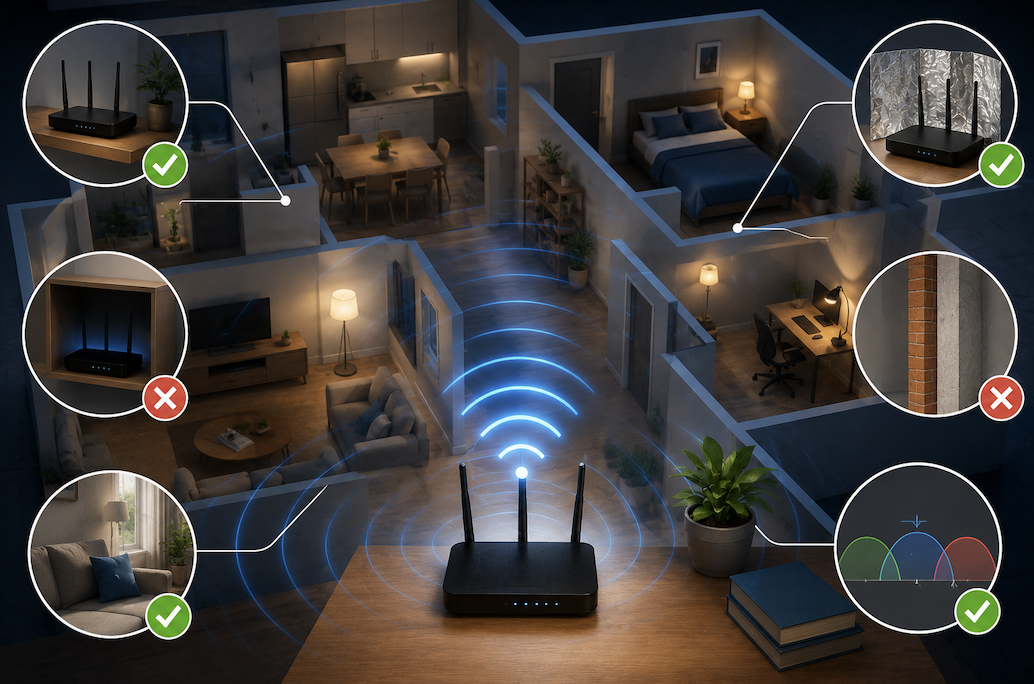
Dealing with weak WiFi signal in certain areas of your home represents a genuinely common frustration, and while purchasing new equipment like a mesh network system offers one solution, several practical, cost-free or low-cost adjustments can often meaningfully improve your existing WiFi performance before resorting to additional purchases. Understanding these genuinely effective strategies helps you potentially resolve WiFi issues without unnecessary spending.
Why Router Placement Genuinely Matters More Than Many People Realize
Understanding that your router’s physical location within your home genuinely significantly affects overall WiFi coverage and signal strength helps clarify why this often-overlooked factor deserves genuine priority attention.
- Central placement within your home generally provides more even coverage compared to placement in a corner
- Elevated positioning, rather than placing a router on the floor, generally improves signal propagation
- Placing your router at a reasonable height, like on a shelf or table, often improves coverage compared to floor placement
- These placement adjustments cost genuinely nothing and can meaningfully improve WiFi performance in various areas of your home
This central placement consideration deserves particular emphasis, since routers typically broadcast their signal in all directions somewhat equally, meaning a router placed in a corner or at one end of your home genuinely wastes considerable signal strength broadcasting into areas outside your home, while central placement helps ensure this broadcast signal actually reaches the areas within your home where you genuinely need coverage.
Why Physical Obstructions Genuinely Weaken WiFi Signal
Understanding how physical objects and building materials genuinely interfere with WiFi signal propagation helps clarify why certain areas of your home might experience weaker coverage despite reasonable router placement.
- Thick walls, particularly those containing metal or dense materials, significantly weaken WiFi signal
- Large appliances and metal objects positioned near your router can genuinely interfere with signal transmission
- Mirrors and other reflective surfaces can also affect how signal propagates throughout your space
- Identifying and addressing these obstructions, where practically possible, can meaningfully improve coverage
How to Identify and Reduce Wireless Interference From Other Devices
Understanding that other electronic devices and neighboring WiFi networks can genuinely interfere with your own WiFi signal helps clarify another practical adjustment worth considering for improving performance.
- Certain household devices, like microwaves and cordless phones, can genuinely interfere with WiFi signals
- Keeping your router positioned away from these specific interference sources can meaningfully improve performance
- In densely populated areas, neighboring WiFi networks can also create genuine interference
- Many routers offer settings to switch to a less congested wireless channel, which can help address this specific issue
This channel switching option deserves particular emphasis, since many modern routers include a feature allowing automatic or manual selection of a less congested wireless channel, and in areas with numerous overlapping neighboring networks, manually experimenting with different available channels can sometimes yield genuinely meaningful improvement without requiring any additional equipment purchase.
Why Updating Your Router’s Firmware Genuinely Matters
Understanding that your router’s underlying software, called firmware, periodically receives updates that can genuinely improve performance provides an important, often overlooked maintenance step worth checking.
- Router manufacturers periodically release firmware updates addressing performance and security improvements
- Many routers do not automatically update this firmware without some degree of manual user action
- Checking your specific router’s settings for available firmware updates represents a genuinely worthwhile, cost-free step
- This update process can sometimes address underlying performance issues without requiring any hardware changes
How Adjusting Your Router’s Antenna Position Can Genuinely Help
Understanding that routers with external, adjustable antennas can sometimes achieve genuinely improved coverage through simple positioning adjustments helps clarify another practical, cost-free optimization worth trying.
- Routers with external antennas often allow adjusting the specific angle of these antennas
- Positioning antennas at different angles, rather than all pointing in the same direction, can sometimes improve overall coverage
- Experimenting with different antenna configurations costs genuinely nothing and can be done relatively quickly
- This adjustment particularly benefits homes with multiple floors or unusually shaped layouts
Why Restarting Your Router Periodically Genuinely Helps
Understanding why this simple, commonly recommended step genuinely addresses certain performance issues helps clarify its continued relevance despite sounding almost too basic to be genuinely effective.
- Routers can accumulate temporary performance issues during extended periods of continuous operation
- Restarting clears this accumulated temporary state, often resolving minor performance degradation
- Establishing a regular restart schedule, even just periodically, can help maintain more consistent performance
- This remains a genuinely simple, cost-free troubleshooting step worth incorporating into regular router maintenance
Practical Steps for Systematically Improving Your WiFi Signal
- Relocate your router to a more central, elevated position if currently placed in a corner or on the floor.
- Identify and address physical obstructions and interference sources near your router’s current location
- Check and switch to a less congested wireless channel if you live in a densely populated area
- Update your router’s firmware if you have not done so recently
- Adjust external antenna positioning if your router includes this feature
- Establish a periodic router restart routine as ongoing, simple maintenance
Why Dual-Band and Tri-Band Routers Offer Genuine Additional Flexibility
Understanding that many modern routers broadcast on multiple different frequency bands simultaneously, rather than just a single frequency, provides an additional genuinely useful optimization option worth understanding for improving your existing WiFi performance.
Different frequency bands offer genuinely different trade-offs, with some providing greater range but somewhat lower maximum speed, while others offer faster potential speed but genuinely reduced range and reduced
ability to penetrate walls and obstructions. Understanding which specific band your various devices are actually connecting to, and manually directing devices toward the more appropriate band for their specific location and use case, can sometimes meaningfully improve overall network performance without requiring any additional equipment purchase, simply through more thoughtful use of capability your existing router likely already provides.
- Modern routers often broadcast on multiple different frequency bands with genuinely different trade-offs
- Some bands offer greater range but lower maximum speed, while others offer faster speed but reduced range
- Manually directing devices toward the more appropriate band for their situation can improve overall performance
- This optimization uses capabilities your existing router likely already has without requiring additional purchases
Final Thoughts
Improving your WiFi signal without purchasing new equipment genuinely comes down to optimizing router placement, addressing physical obstructions and interference sources, keeping firmware updated, and periodically restarting your equipment as basic maintenance. Working through these practical, cost-free adjustments systematically often resolves common WiFi frustrations, potentially saving you the expense of additional equipment while achieving genuinely meaningful improvement in your home’s actual wireless coverage and performance.
Frequently Asked Questions
1. How much improvement can I genuinely expect from simply repositioning my router?
This varies considerably by your specific home layout and current router placement, though many people report meaningfully noticeable improvement simply from moving a poorly positioned router to a more central, elevated location within their home.
2. Do these free adjustments work as well as purchasing additional equipment like a mesh network?
For many common WiFi issues, these adjustments can provide genuinely significant improvement, though homes with particularly large square footage or unusually challenging layouts may still benefit from additional equipment even after implementing these free optimization strategies.
3. How often should I actually check for router firmware updates?
Checking every few months provides a reasonable balance for most users, though enabling automatic updates, when your specific router offers this option, provides a more consistently maintained approach without requiring you to remember manual checks.
4. Can too many connected devices genuinely weaken my overall WiFi signal strength?
While this affects available bandwidth more directly than raw signal strength, having numerous devices actively using your network simultaneously can genuinely affect overall performance, making periodic review of your connected devices a reasonable complementary strategy alongside these signal optimization steps.
5. Is it worth trying all these adjustments together, or should I test them individually?
Testing adjustments individually, when practically possible, helps you understand which specific changes provide genuine improvement for your particular situation, though implementing several reasonable adjustments together is also a genuinely practical approach if you prefer a more efficient, combined effort.